





I was honored this week to speak with educators in Barcelona. While I know some Spanish, I am not fluent. Wanting to use a Google Form to collect responses from audience members I knew that my Spanish was not sufficient to quickly translate and understand. Google Sheets however makes it easy to translate.
=GOOGLETRANSLATE()
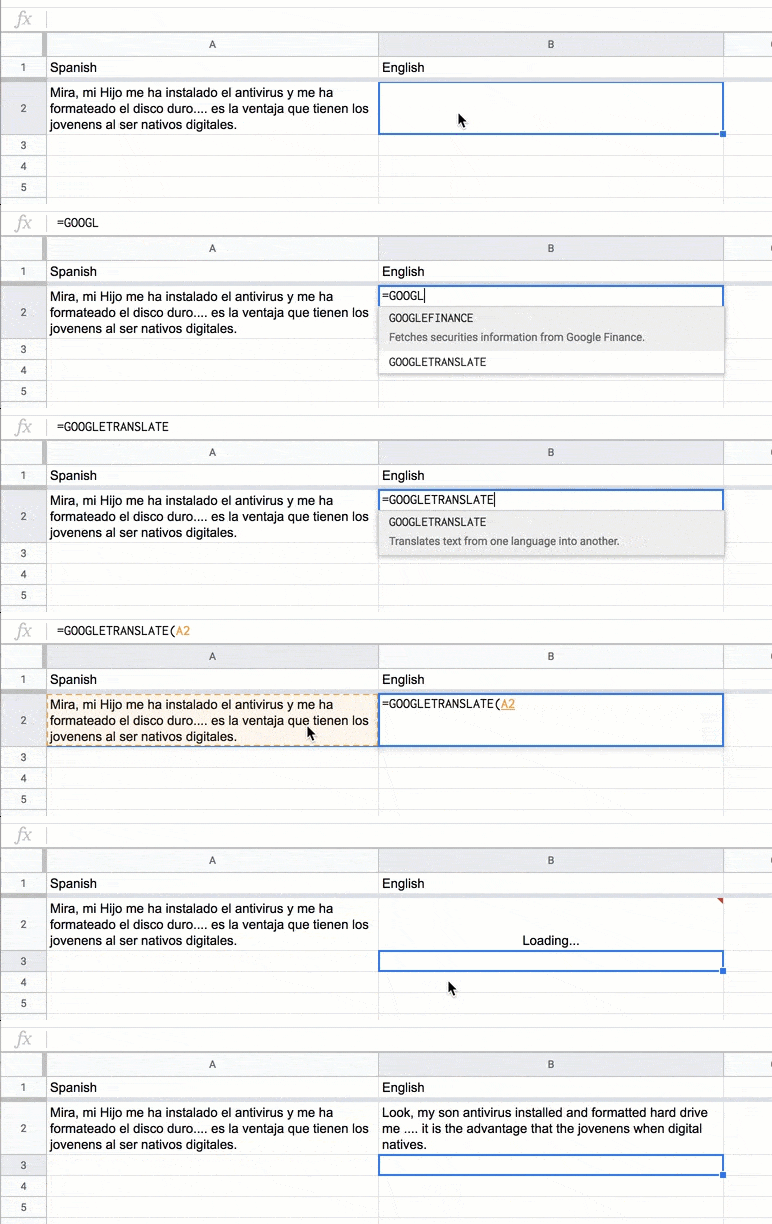
The formula =GOOGLETRANSLATE() will convert text in one language in Google Sheets to another language.
CopyDown Add-on
The copyDown add-on for Google Sheets will automatically copy a formula in a spreadsheet upon Form submission.
Create a Google Form. On the Responses tab, select the spreadsheet icon. In a blank column for the first response to the Google Form write the formula =GOOGLETRANSLATE(). Use the Add-on menu in the spreadsheet to select “copyDown.” The add-on will automatically detect the formulas you have written in the spreadsheet and allow you to copy that formula to each row dynamically as entries are made to the Google Form.






1 thought on “Google Sheets: Translating Languages”
Very interesting! Thanks for sharing and the keynote of yesterday.