
UNDER CONSTRUCTION: This site will be updated shortly to provide a complete screenshot tour of Google Classroom
A Tour of Google Classroom
Alice Keeler (and co-authors Libbi Miller, Matt Miller, Kim Mattina, Christine Pinto, and Diana Herrington) has authored educational technology books designed to help you go further than simply replacing paper. Engage more learners through Google Apps, Google Classroom, Google Jamboard, and by Ditching That Homework. Find Alice Keeler’s books on Amazon or bulk order from books@daveburgessconsulting.com. Want more help with using technology in the classroom? Consider becoming a member for tech support, premium resources, personal interactions and support, and online workshops.
Teacher View
Both students and teachers start at classroom.google.com to access Google Classroom. It can also be accessed from the Apps Chooser (Waffle) in the upper right of Gmail or Google Drive.
Home Screen (Classes Page)
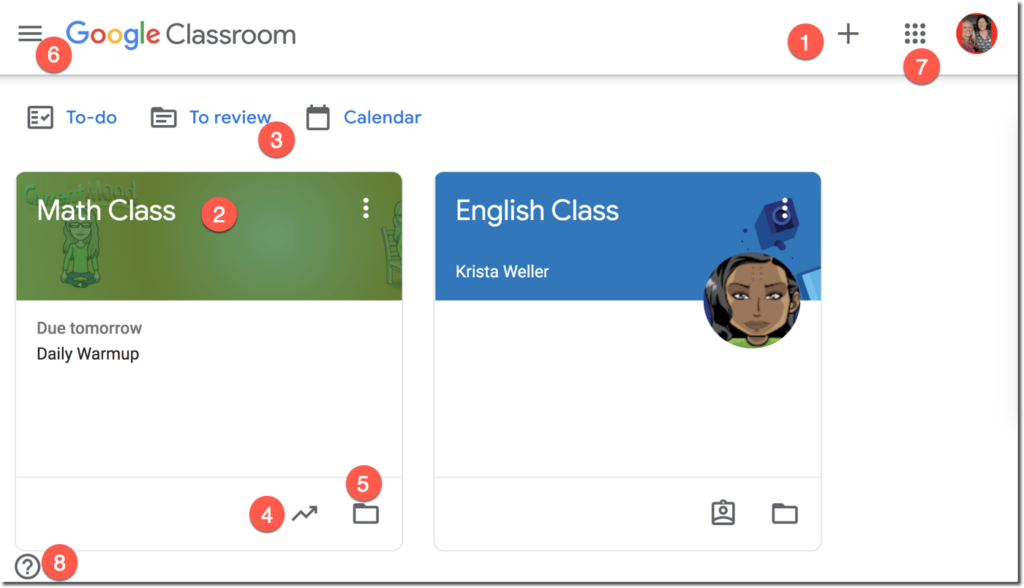
- Click on the plus icon to create a new class or to join a class as a student.
