






Tip for using Google Forms: Try to use Multiple Choice and Drop Down options as often as possible. When you let students or others fill in the Form with open response answers it is difficult to sort and filter by that response. If possible, add a drop-down list of the student names for them to choose on the Form.
Want More Help with This? Become a Premium Member
Multiple Choice, Checkboxes, Dropdown
Any of the question types in Google Forms that let you present the responder with a list of options you can PASTE the list. No need to tediously type (or copy paste) each option one at a time.
Paste All At Once
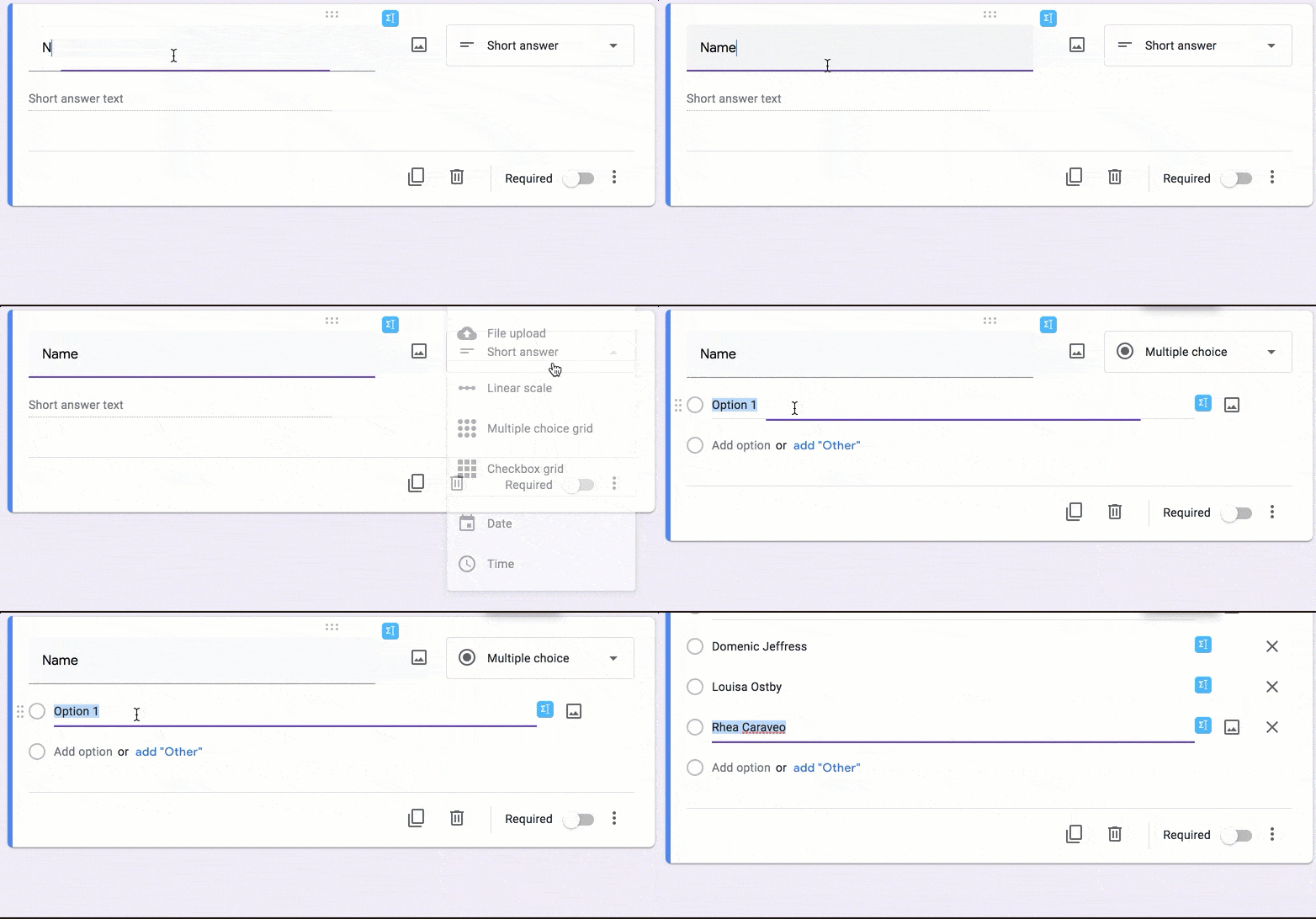
You do NOT need to copy and paste each name one by one. On the multiple choice question choose “Option 1.” While Option 1 is highlighted use Control V to paste the list of names.
Separate Options
If you have question options in a Word Document, Google Doc, or a spreadsheet you can copy and paste into options lists, the entire list at once, into Google Forms. The trick is, each option needs to be on it’s own line. In Word or a Google Doc this means your options are on different lines. You have pressed Enter between each option choice. In Google Sheets this means each option is in it’s own cell, vertically.
Paste Special
If your options are NOT pasting correctly try pasting them into a Google Sheets spreadsheet but hold down the SHIFT key when pasting. Control Shift V is paste special and sometimes this will fix some of your copy paste woes.





