






This article contains old information. Google Drive template gallery has been completely redesigned. Go to docs.google.com to find the template gallery for Google Doc.
Want More Help with This? Become a Premium Member
https://drive.google.com/templates
Currently in the new Google Drive you are not able to add a document directly to the template gallery. By going directly to the template gallery at https://drive.google.com/templates you are able to add your templates there.
Submit a Template
On the right hand side of the template gallery is a link to “Submit a template.” Click on this to add your Google Docs to the gallery.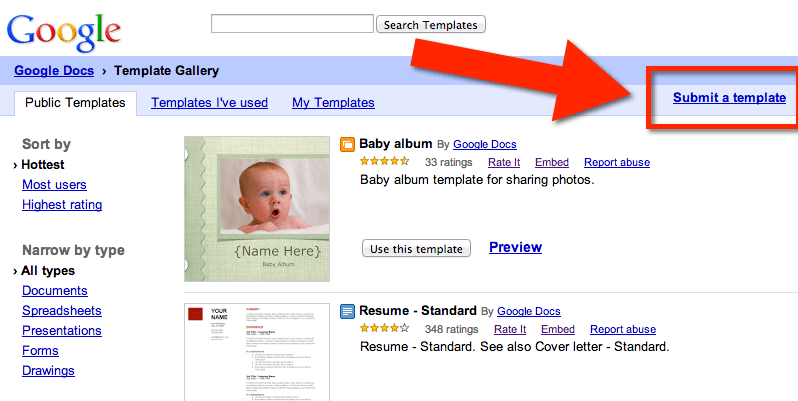
Note that currently the new Google Sheets does not upload to the template gallery. There is also a lag between when you upload and when they appear in the gallery.
Direct Students
If you create a template and want to direct students to your template, click on “Preview” for the template you wish to share with them. Copy the URL while you are previewing the template.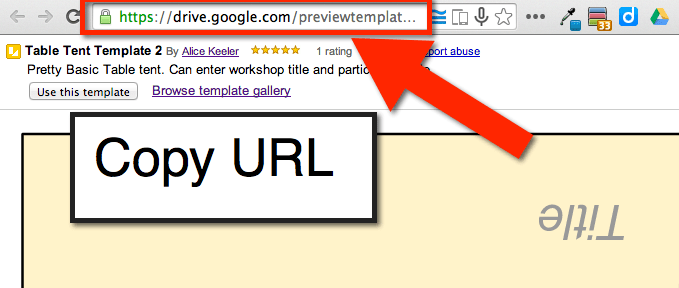
Students will link to the URL and then click on “Use this template.”
Your Templates
While previewing one of your documents notice that your name is hyperlinked next to the template title. Click on your name to filter templates by you. Copy the URL while looking at your list of templates. Sharing this URL will take students to all of your templates. Click Here to see my template gallery.
Google Classroom
If you are using Google Classroom you will probably not need to use the template gallery. However, there are many collaboration reasons outside of the classroom that might necessitate the gallery.





