






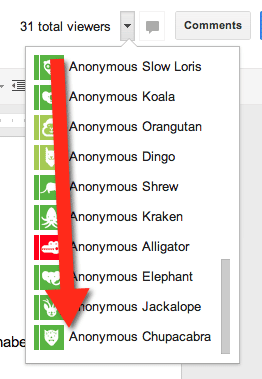
A fun game I like to play is “hunt for the chupacabra.” In Google Docs and Google Presentation, when people link to your document, but are not implicitly shared* with your document, they join your document as an anonymous animal.
Step 1
Create a Google Doc or Presentation.
Step 2
After naming the document, click on the blue share button

Step 3
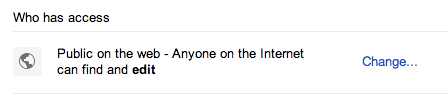
Make the document publicly viewable or anyone with the link can view. You can also set it to anyone with the link can EDIT. I like the can edit option when I share with students so I do not have to worry about them remembering their password in order to participate.
Step 4
Share the link with students (or out on twitter). I like to use http://goo.gl to share a shortened link.
Step 5
Tell the students we are on the hunt for the chupacabra.
Step 6
Keep checking who is joining the document, you can see the list in the upper right.
Step 7
CHEER when the chupacabra shows up. It is a fun community building activity to have a goal and reach it. The students will enjoy working on collaborative documents when they can be on the hunt for the chupacabra!
*I have noticed sometimes someone NOT implicitly shared will show up as themselves and not anonymous. I can not yet figure out why. I know if you insert a comment you stop being anonymous.






4 thoughts on “Hunt for the Chupacabra”
Fun! Thanks for sharing, Alice. I saw a strange anonymous animal yesterday… the anonymous Nyan Cat complete with a rainbow. I like that one, too.
Choose the animal you like best! It is a fun game. Also, maybe you want to track down the full list and then have each student choose their own so that they can all have something to cheer for.
This is awesome – I love the chupacabra – especially great for my Spanish classes!
“Other people’s names are only shown when you give them view or edit permissions individually or as part of a mailing list.”
https://support.google.com/docs/answer/2494888?hl=en