At Google Cloud NEXT I sat down with Allen Firstenberg for his Two Voice Devs podcast. Amongst other topics, we touched on using Google Gemini to help you better use Google Gemini.
“You see your problem is, you’re using Gemini, and I’m using Gemini.” – Allen Firstenberg
Using Google Gemini
I couldn’t help myself, I had to include my favorite Allen quote about Google Gemini. Gemini is EVERYWHERE. It’s in Chrome, it is in the sidebar of your Google Doc, it’s the assistant on my phone. And it is of course in Google AI Studio. The capabilities in each location of what you can do with Gemini can vary, however, what you always need for all of the places you can use Gemini is… a good prompt.
How to Write a Good Prompt
I promise your teachers did not teach you in school how to prompt Google Gemini. When you are chatting in Gemini Chat box, what you’re really doing is prompting. Providing Gemini with the directions of what you want it to do. While it is getting pretty close, Gemini is not a mind reader. You need to be as specific as possible and be able to clearly communicate what you want. This is tricky.
Use Your Words
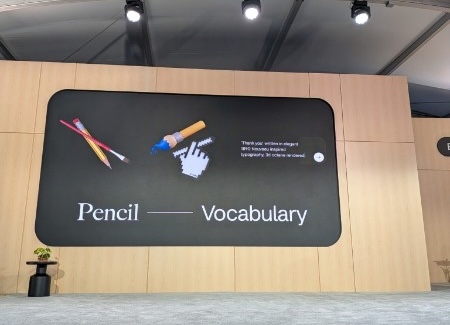
At Google I/O this week I sat in on a session titled “AI Tools for Human Creativity.” It was artists sharing how AI tools have transformed their workflows. One presenter, Sanchit, shared the importance of being an expert and using your experienced vocabulary to ensure your AI output is exactly what you were expecting.
I particularly resonated with this sentiment as a math teacher. Mathematical practice #6 (MP6) is about using precise language. I’m a firm believer that the mathematical practices are not just about math but about critical thinking. It is so important that, as educators, we are teaching our students to clearly communicate their ideas and enrich their vocabulary so that, amongst other reasons, they can better utilize modern tools.
Prompting Tips
Start by telling the AI who it is pretending to be, such as a creative middle school teacher who loves project-based learning, which instantly sets the right tone. Next, share a little context about your students, perhaps mentioning that you need an activity for a specific grade level working in small collaborative groups. Clearly state what you want the end result to be, whether that is a list of project ideas or a collaborative team challenge. Remember that you have total control over the direction, so if you want to avoid traditional, compliance-based worksheets, just say so right in your prompt and explicitly ask for an interactive experience where students have choices.
Let Gemini Help You Write the Prompt
Start with a conversational chat where you are trying to describe your vision. Instead of trying to prompt … brain dump. Give Gemini all your messy ideas. Then ask Gemini to write your prompt. This will help you learn to create prompts, and also give you something you can reuse.
Reuse Prompts with GEMS
A GEM is a saved prompt in Google Gemini. You want it to be generic. For example it describes your style of lesson plan, but not the learning objective. When you add the learning objective into the GEM chat, you do not need a prompt. You just say “Quadratic formula” and Gemini knows what to do.
Join Alice Keeler for this session for teaching with AI
Imagine having a team of teaching assistants who already know your syllabus and exactly how you like to give feedback. Join Google Certified Innovator Alice Keeler to learn how to use Google Gems to build a powerful collection of custom AI tools. We will explore how to engineer specific instructions so you can create a Grading Assistant or a Classroom Policy Manager that works for you. You will also learn how to leverage Gems shared by other educators to instantly expand your toolkit. This session is about super-powering your teaching by automating the routine tasks so you can focus on the students.
Exit this pop up by pressing escape or clicking anywhere off the pop up.