

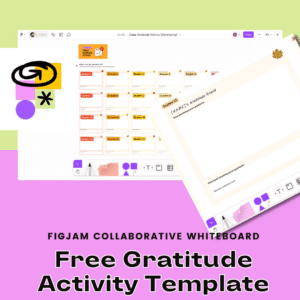




For years I have been suggesting you write the word COLLABORATION really large at the top of your lesson plans. A key to collaborative activities is tools that allow multiple students to work together in the same space. FigJam by Figma is a great way to accomplish this. You can see one way to have all students together in the same space with the Gratitude Activity template.
FigJam is Free for Educators
Verify you are an educator at figma.com/education to gain access to the full features of FigJam.
Gratitude Activity Template
I frequently am checking out figma.com/@education for templates. There is always new things to check out!! You can find my templates at figma.com/@alicekeeler. While perusing the new templates I came across the Class Gratitude Activity. This is a great example of how to set up your FigJam to get all students on the same page.

24 Sections for 24 Students
The template has a section per student. Not to fret if you have more than 24 students in a class. Click on one of the sections, or lasso and select multiple sections, and use Control D to duplicate the section. Adding more student sections is super easy!
Move to Project
By default your FigJam files are “Draft.” Click on the arrow next to the document title to “Move to project.” This really is just organizing it into a folder for you.
Share the Template
Use the share button in the upper right to share with your students.
Paste the email addresses of the students into the sharing options OR click on the “Start open session” to get a link you can share that gives anyone with the link edit access.

Students Rename Their Section
Assign each student a number so they can quickly find their section and rename the section title to their name.
Spotlight on Me
After students have filled out their gratitude section, share a few as a class. In the upper right is your collaboration icon. Click on it to select “Spotlight me.” This will make it easy for students to follow where your cursor is.

Shift 2
If you select a section, which is identified by the 4 corners of the section having a small rectangle on them, use Shift 2 to zoom in on that section. Shift 1 zooms out to the whole board.
FigJam Is Designed to Get Together
While you certainly can use one FigJam per student, you’ll notice that FigJam is designed for everyone to be in the same space!! This makes it easier to review student work, give peer feedback, and to be together!! Enjoy!!
-

ReadWorks and the Power of the Daily Article Routine
ReadWorks is a free, research based, tool to aid in reading comprehension. Try the Article-A-Day to save time and provide differentiated options for readers.
-

DOK = Critical Thinking
DOK is the measurement of critical thinking on a task. Better understanding Depth of Knowledge helps you to better incorporate critical thinking into lessons.
-

3 Google Sheets Shortcuts You’ll Actually Use
The answer is always a spreadsheet, but sometimes the tips are hard to remember to implement. Practice these 3 Google Sheets shortcuts to really help
-

Transforming the Reading Log
Reading logs can lean into compliance over developing a love for reading. Try ReadWorks to help support building knowledge and a love of reading.
-
10 YouTube Hacks for Teaching
YouTube is a powerful tool in the classroom. Here are 10 hacks to help you get more out of YouTube.
-

Amplify Student Voice and Redefine Classroom Possibilities
Technology should serve as a bridge that connects students rather than a wall that isolates them. Curipod™ helps fulfill the true promise of educational technology by shifting the focus from passive clicking to active student voice.



