






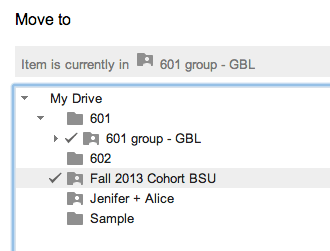
There are 2 places to file a Google Doc into a folder (besides Google Drive). The first is the folder icon right next to the document title. You will also find the folder icon under the File menu listed as “Move to folder…”
Multiple Folders
When you choose to put a document into a folder you can actually choose to put the document into MULTIPLE folders. Hold down the command key (control on a PC) and click on multiple destination folders when organizing your document.






2 thoughts on “Move Google Doc to a Folder and Organize into Multiple Folders”
Great post.
I have a question. Do you ever go into your Google Classroom folder (through your Drive) and organize? After a year’s worth of work, it becomes this stream of folders. I am trying to think of an efficient process of creating unit folders and then dropping in these assignment Classroom folders (as sub-folders). I know its just a little effort on my part, and I don’t mind, I am just curious if you have a process.
The same question for our students as well. They have this stream of 100+ assignments in the Classroom Drive folder, which is very chaotic, especially if they want to go into their Google Drive Classroom folder and access past assignments to study for tests and quizzes (I teach high school). Do you have a process you use with your students to help them organize their Google Classroom Drive folder. I am thinking of just having my students go into their Drive and create Unit folders and then drag and drop the files they get (from my through Google Classroom) everyone once in a while.
Your thoughts are appreciated 🙂
ABSOLUTELY! You can safely drag your old folders into an “Archive” folder in Google Classroom. In fact, do that as you go. If you’re done assessing an assignment, drag the subfolder from the Classroom folder into your Archive folder.