






I have found that knowing a little bit of HTML is wildly useful. One might be surprised at all of the Web 2.0 applications that allow you to insert HTML tags. I always recommend to fellow teachers to learn a few basic tags. Learning these tags will help them to be more productive and to possibly make their resources and activities more closely in line with what they envisioned.
I was using survey monkey today and wondered if I could add images to the header by uploading my pictures to photobucket and getting the image HTML code. I simply pasted that code into the header. Worked like a charm. It was not readily apparent that I could do this so it turned out to be yet another surprising place I was able to put my HTML skills to work.
My first recommendation is to do a Google search for “html for teachers” or “html tutorial.”
You do not need to do the entire tutorial but know a few basics. Once you’ve gone through a few of the lessons try googling “HTML cheat sheet” and printing out a page of common tags that you might want to use.
An HTML tag is a code that goes between a less than and a greater than symbol. <tag>
Typically there is a start and an /end tag. <b> and </b> The slash next to the b is saying to stop bolding the text.
Here are my recommended tags
| Description | Start Tag | End Tag |
| Bold | <b> | </b> |
| Italics | <i> | </i> |
| Underline | <u> | </u> |
| Horizontal Line | <hr> | |
| Paragraph | <p> | |
| Line Break | <br> | |
These other HTML tags are useful also
| Description | HTML |
| Insert an image | <img src=”URL of image”> |
| Insert a link | <a href=”URL”>Text Shown such as click here</a> |
I also find it very useful to know how to code a table and bullet points. You can find those in the HTML lesson tutorial linked above.
A comment by Luann
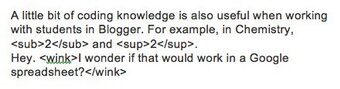
My response: Yes, Luann, that would be nice if we could use HTML in Google Spreadsheet. You can insert images into a cell, which can be a work around. Also you CAN use HTML in a Google SITE!






3 thoughts on “A little HTML for teachers”
A little bit of coding knowledge is also useful when working with students in Blogger: 2 and 2. Hey. I wonder if that would work in a Google spreadsheet?
A little bit of coding knowledge is also useful when working with students in Blogger: for example, in chemistry, 2 and 2 . Hey. I wonder if that would work in a Google spreadsheet?
http://www.mcli.dist.maricopa.edu/tut/ above is a dead link. You may want to replace it with http://www.freetech4teachers.com/2013/01/a-beginners-guide-to-html-css.html#.VAiyjRYcGlw
Thanks for the article.