





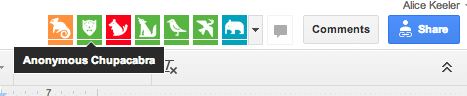
If you have ever clicked on the blue share button and set your document to “Anyone with the link can view” or to “Public on the web” and shared the link with people not expressly shared on the document you may have noticed these random animals at the top of your document. Each random animal is an anonymous viewer who has been randomly assigned an animal. My favorite is the chupacabra, since the animals appear randomly it is fun to choose a favorite.
Click on the Icon
What can you do with these icons? If the icon is anonymous or even if it is the picture of someone you know, you can click on the icon and jump to the spot in the document where the person is editing. This is particularly helpful in a Google Presentation. I had all of my classes editing a single Google Presentation, which meant there were over 100 slides. When I click on the icon of a student who asks me a question I am able to quickly get to the slide they are working on and insert comments.








4 thoughts on “What is Up With Those Anonymous Animals in a Google Doc?”
Are the images only visible when the person is in the document? I am confused how it works. Or is it a tracking device for anyone who was in the document? Thanks
Theoretically the anonymous animal is only there when the person has the file actively open.
If I own the document can I track who is logged in anonymous some kinda way?
No, you can only track if you share explicitly