






I’m always looking for activities to help students to think more in math! It is a common misconception that math class teaches critical thinking. When in fact most of the math problems in a typical math problem are DOK 1; low critical thinking. Check out Pam Harris who provides some great tips on ways to teach math. I saw that she had tweeted out “Factor Puzzles.” I then added this to my Google Slides Add-on Dice Slides.
Factor Puzzles!
— Pam Harris (@pwharris) December 1, 2022
Any student who is learning multiplication and integers is ready for these. Every algebra teacher everywhere wishes students were playing this game A LOT.
#MTBoS #ITeachMath #MathIsFigureOutAble #Elemmathchat #MSmathchat #HSmathchat #MathStratChat pic.twitter.com/DtMlzyoWvk
Dice Slides by Alice Keeler
I have a free Add-on that collects NO user data. Dice Slides is for Google Slides to help you turn your Google Slides into a game. You can add random dice rolls to the current slide while in edit view, not presentation view.
I also have added the capability to add game boards to Google Slides.
Any Google Slides
Dice Slides works with any Google Slides presentation. This does not work while you are presenting. This is an Add-on for when you are editing Google Slides. It is intended to use Google Slides as an interactive tool rather than a presentation tool.
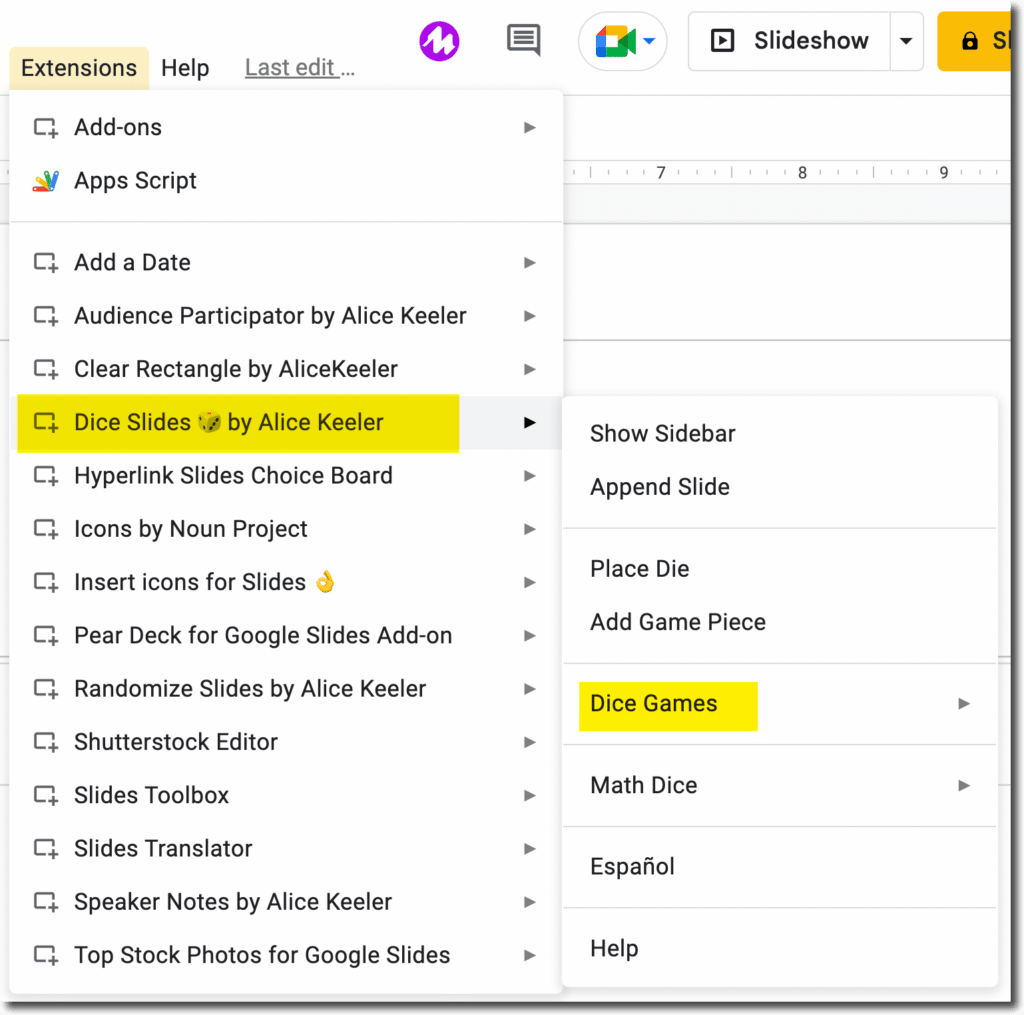
Extensions Menu
To add game boards and math puzzles to your Google Slides use the Extensions menu. Select Dice Slides by Alice Keeler. Then choose “Dice Games.” The factor puzzle is not a dice game, but it does generate random numbers kinda like a dice roll 🙂
Current Slide
The games are added to the current slide. Add a blank slide to add the factor puzzle.
A sample puzzle will be placed on the slide showing that the two middle integers multiply to the top number and add to the bottom number.
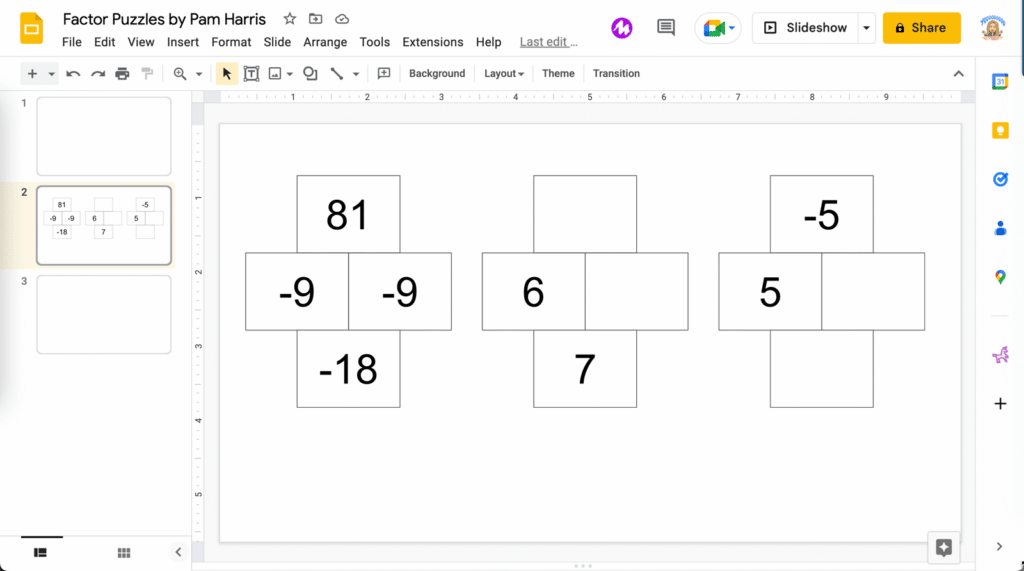
Two puzzles will also be added to the slide. One where the students look for a number that adds to the bottom number. The other is looking for a number that multiplies to the top number.
Project the Puzzle
By adding Pam Harris’ factor puzzle to Google Slides it makes it easy to do a quick warm up with students. In ANY Slides presentation, add a blank slide and then insert a puzzle. Project for the students to figure out the puzzles.
-
ReadWorks and the Power of the Daily Article Routine
ReadWorks is a free, research based, tool to aid in reading comprehension. Try the Article-A-Day to save time and provide differentiated options for readers.
-

DOK = Critical Thinking
DOK is the measurement of critical thinking on a task. Better understanding Depth of Knowledge helps you to better incorporate critical thinking into lessons.
-

3 Google Sheets Shortcuts You’ll Actually Use
The answer is always a spreadsheet, but sometimes the tips are hard to remember to implement. Practice these 3 Google Sheets shortcuts to really help



