
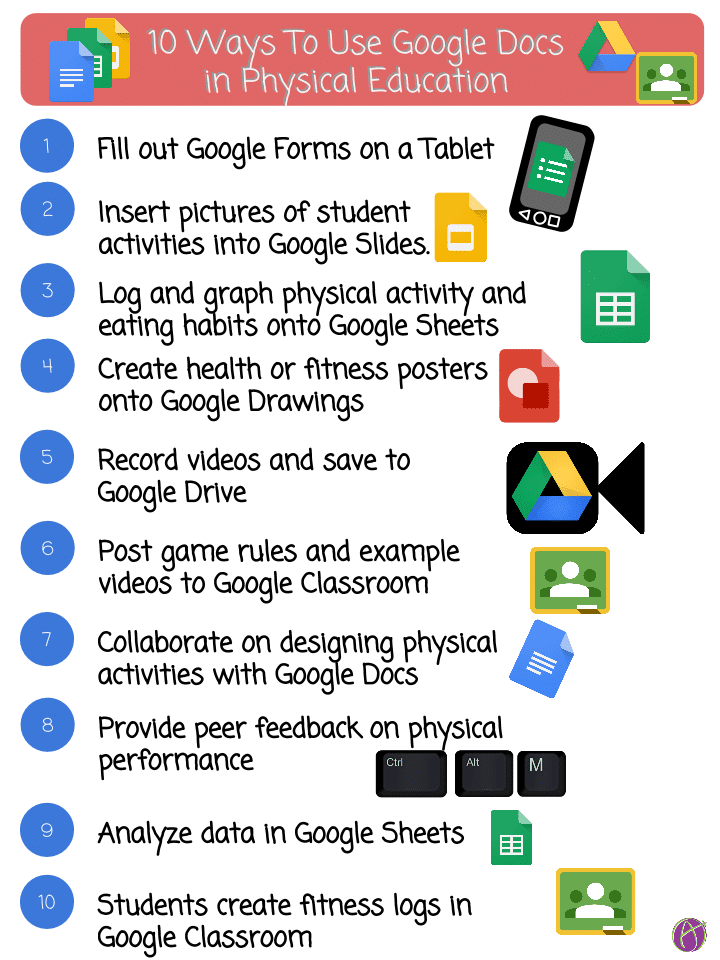
Link to Google Drawing: https://goo.gl/i8U5vj
Teachers, please feel free to use this at your schools and with students. This image is under copyright, please do not republish onto public blogs.


Link to Google Drawing: https://goo.gl/i8U5vj
Teachers, please feel free to use this at your schools and with students. This image is under copyright, please do not republish onto public blogs.










1 thought on “10 Ways to Use Google Docs in Physical Education”
Thanks for this blog and those great tweets. I am getting Googliterate… Today I made strides with Google forms/responses a should be able to easily collect much relevant student information at the beginning of the year. I also got stuck into Google Classroom and should be much further ahead in the next few days. I have some time as we do not start until after Labour Day here in Canada. So I’m feeling optimistic about it all.
Again, thanks for sharing.
JMcK