






Problem: Your teacher computer is connected to the VGA cable to the projector. Students are doing presentations and need to log into their Google account to get to their presentation they are going to do in front of the class. You have to log out of your Google account to let them log in.
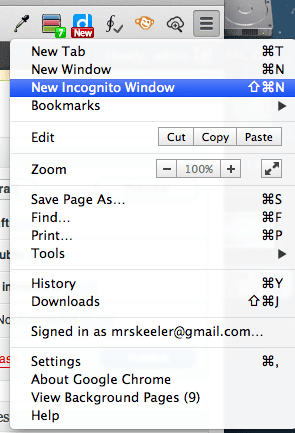
Solution: If you are using Google Chrome, you can create an incognito window (command+shift+n on a Mac) (control+shift+n on a PC). This allows the student to log into their account without logging out of yours. Close the incognito window when the student is done, open a new incognito window for the next student to log into.
(adsbygoogle = window.adsbygoogle || []).push({});






3 thoughts on “Use an Incognito Window to Allow Students to Present from Your Computer”
Is this ever handy! Why didn’t I know this before? This may be the single-most useful tip I’ve seen so far this summer! Thanks.
Oh this is great! Hadn’t thought of that so definitely something I will use.
I agree with Peter! It is also helpful when I have to log in to my school’s and my personal Gmail accounts at the same time. Thanks, Alice!