





This is a game changer, from your mobile device you can record video straight to Google Classroom.
Record Video to Assignment
On your mobile, create an assignment and tap on the paper clip icon at the top. The last option for attachments is “Record Video.” This is not add a video you already made, but rather to record video now right into Classroom. And by that I mean right into Google Drive since nothing actually lives in Classroom.
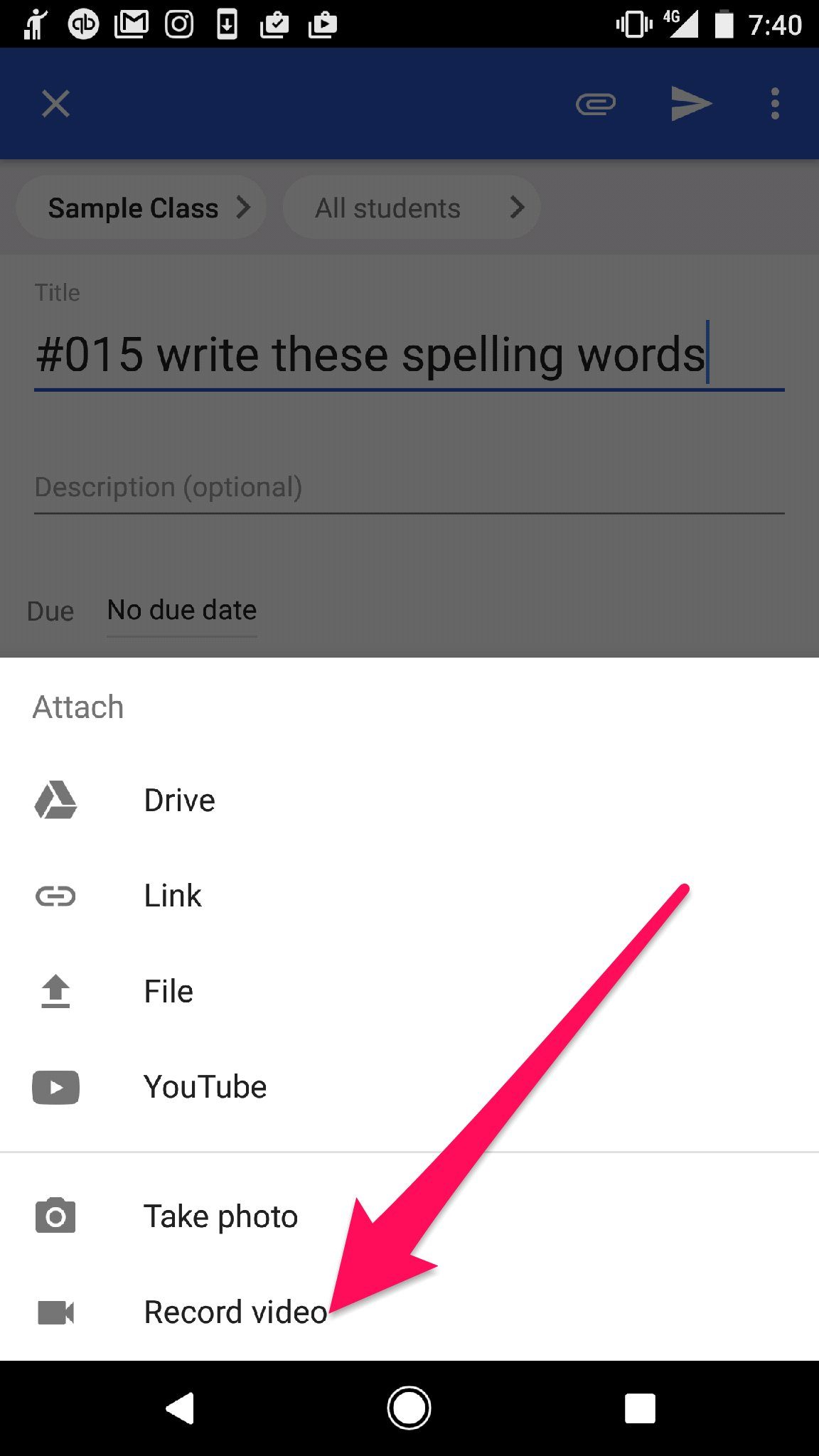
I am in an Uber right now in London, UK and was able to add a short video right into this Classroom assignment. Talk about being able to teach from anywhere!!
Notice the MP4 linked in the assignment. So super easy!!

Students Can Submit Video
When on mobile, students can use the app to submit video. They tap on the assignment, tap on “Student work,” and tap on “add attachment.” One of the options for students is to “Record video.” Flip the camera around and students can record themselves orally demonstrating their learning.








14 thoughts on “Google Classroom: Record Video Straight to Classroom”
Maybe I am missing something but I do not see the paper clip option to even get to that step. Any ideas??
It might just say “Add attachments”
Is this only available on Android? I have an iPhone and this option isn’t listed.
Might be Android. Loving my Pixel.
Ha! Trying to find a Pixel 2 XL is quite a feat. I’m still looking!
Hi Alice!
This is awesome. As always, thank you for sharing update knowledge and, more importantly, how to make best use of it for student learning.
On a side note, I’m so terribly sorry to hear about your co-author. My thoughts are with you. She obviously meant a lot to you. The book is, of course, fantastic!
Best regards,
Adam
Thank you Adam. She was a wonderful person and educator. It’s a huge loss not just for me but for all of us. We were mostly done with version 2 of the Math book and I was definitely not done stealing all her awesome ideas. She’s brilliant! I’m very sad.
Thanks Alice! This looks like a very viable alternative to Flipgrid.
I just tried this with a students account and there was no add video. There was a camera choice though. Could the student choose camera and then put it on video?
Honestly, I prefer to do the video with the phone and then add the video to classroom, less chance of the video corrupting and losing it.
can students directly record a video response to an assignment using their chromebook? Or do they have to pre-record the video, select the file, and upload it?
Have students use screencastify
I’m not seeing this option for Chromebooks. Was trying to find a quick way for students to record a video answer to an assignment in Google Classroom using their Chromebooks.
This is for Android devices