






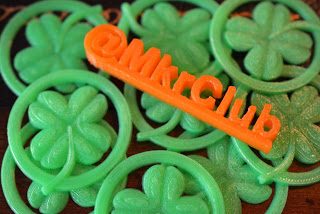
I know my kids love getting bookmarks. My 5 year old flipped over the 3D printed heart bookmarks that @mkrclub posted. She brought them for all her classmates for Valentines Day. Mkrclub has been on a roll designing new bookmarks. Mkrclub.com posted the files for St. Patricks day bookmarks recently. In an effort to peer pressure him to make more, you can encourage your students to read by giving them seasonal bookmarks you 3D print!
3D Printer
To make the bookmarks you will need a 3D printer. Nothing says “we are trying new things in here” like melting plastic! The Horizon report has for multiple years predicted that 3D printers are an up and coming hot product for the classroom. Why do you need a 3D printer? Besides the fact that 3D printing is fun, it encourages students to engineer, create, iterate, model, and prototype. The first thing you do with a 3D printer is melt plastic. Keep melting plastic. Download STL files to upload to your printer and print out fun things. Print out objects other people have made that relates to your subject area. Just melt lots of plastic and get a handle on how to use the printer. 3D printed bookmarks are a fun way to start with your 3D printer. Your students will also get a kick out of using the bookmarks when they read!






2 thoughts on “Support Literacy with 3D Printed Bookmarks”
How does the 3D affect the book? Will it tear thicker novels or can it slip over the pages similar to a paper clip? How robust are you finding these in your books?
They are for fun. I wouldn’t get crazy with them.