
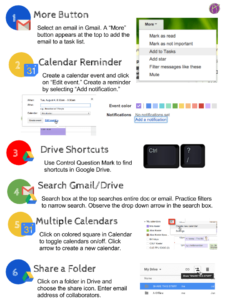
Click Here to link to the Google Drawing.
Please feel free to use this graphic in trainings with teachers and students. Please do not publish the graphic to your blog or other public sites.

Click Here to link to the Google Drawing.
Please feel free to use this graphic in trainings with teachers and students. Please do not publish the graphic to your blog or other public sites.








© 2026 All Rights Reserved.
Join Alice Keeler, Thursday April 15th or register to gain access to the recording.
Create a free OTIS account.
Join Alice Keeler for this session for teaching with AI
Unlock a smarter way to manage your curriculum by turning your own teaching materials into a personalized AI assistant with NotebookLM. This session explores how to transform static documents into interactive study guides and audio overviews that are tailored strictly to your specific content. You will discover how this versatile note-taking tool can streamline your prep time and help you organize complex resources with ease. Join us to see how NotebookLM can act as a powerful, free partner in your K-12 classroom.
1 thought on “6 Google Tips – Infographic”
Hey Alice–useful post! Thanks! Just one issue: At least on my Mac, the shortcut key for bringing up the keyboard-shortcuts-reminder is COMMAND and ?, not control. Perhaps its a Mac/PC thing….might be worth pointing out.


