






At CUE Rockstar Teacher Camp this last week several of the attendees embraced twitter (thanks to @jenroberts1). Here are a couple of twitter things that #cuerockstar attendees might find helpful.
First Tip: If you start a tweet at someone (use the @ symbol) only people who follow BOTH of you will see it in their stream. Notice in the sample tweet below that Jen Roberts started her tweet with a period, this will allow all of her followers to see her tweet not just those following her AND Catlin Tucker. So take note when you hit reply.
 Jennifer Roberts
 .@CTuckerEnglish @seani My post about using Google Voice with students. http://whatdoyouteach.blogspot.com/2012/01/this-teacher-texts.html #cuerockstar #googlect
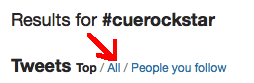
Second Tip: Follow a hastag (#) by clicking on it, but it will likely show you only the “TOP” tweets instead of all the tweets. At the top click on ALL instead of the default “Top.”
Find hashtags to follow that help you be a better educator like #edchat or #sschat or #engchat
Third Tip: Click on connect at the top to see who is tweeting at you so you can stay part of the conversation. Note if you click on a tweet that was replied to it will expand and show you what it is replying to, so if you feel you came in the middle of a conversation just click on the tweet itself to get the whole picture.






