





I have a small addiction to Google Communities. I love using them with students and also with groups I am collaborating with.
One feature of a Google Plus Community is the ability to add events. I will use these events to post major due dates, and to just create an area to discuss a particular assignment or topic.
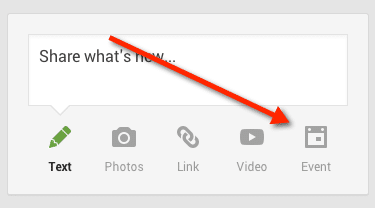
In the Google Community click on the “Event” icon in the “Share what’s new…” box.
Creating an event alerts the people in the community that there is something going on and gives them a separate space to discuss that event. It also allows for creating a Google Hangout or a Google Hangout on Air.
A Google Hangout is a video chat.
By creating the Google Hangout in the Google Community it makes it easy for group members to find their way to the hangout. After the event is created, participants can find the link to the hangout right in the Google Community.
In the Event creation screen, click on “Event options.” Under Advanced options is the choice to make the event a Hangout or a Hangout on Air.
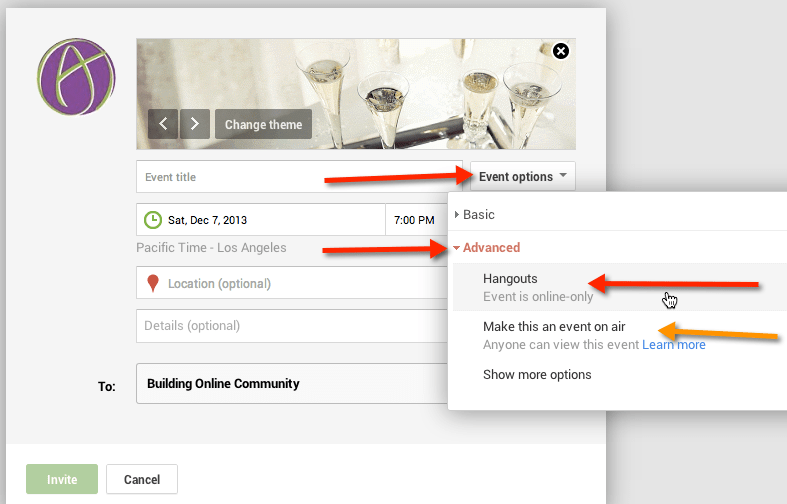
A Hangout on Air is broadcast and saved to YouTube, which can be great for having a record of the conversation. However, be warned this is PUBLIC. Hangout’s on Air are broadcast live to your Google Plus stream and is posted publicly on the Google Hangout on Air page on Google Plus. Theoretically strangers can watch your hangout. This is NOT an issue with regular Google Hangouts.






4 thoughts on “Google Hangouts from a Google Community”
Is it possible to have a Google Hangout with “yourself” and record it in video form? Thinking this might possibly be a use for student news broadcast.
Yes, I have hangouts with myself all the time.
Is it possible, all these years later, that “Events” has been removed from Communities features/integrations?
…I can’t seem to follow your directions with current version.
Events are gone