






Drag and Drop Assignments and Topics in Google Classroom
An update to Google Classroom now allows you to more easily reorganize your assignments and topics in Google Classroom. Go to the Classwork page and simply DRAG assignments to the topic or position you want them.
Move a Topic
New material at the top! Every website puts new content at the top. Drag your current unit/topic to the top of the Classwork page in Google Classroom so that it is not “out of sight, out of mind.” Why have students scroll past old assignments they are no longer looking at?
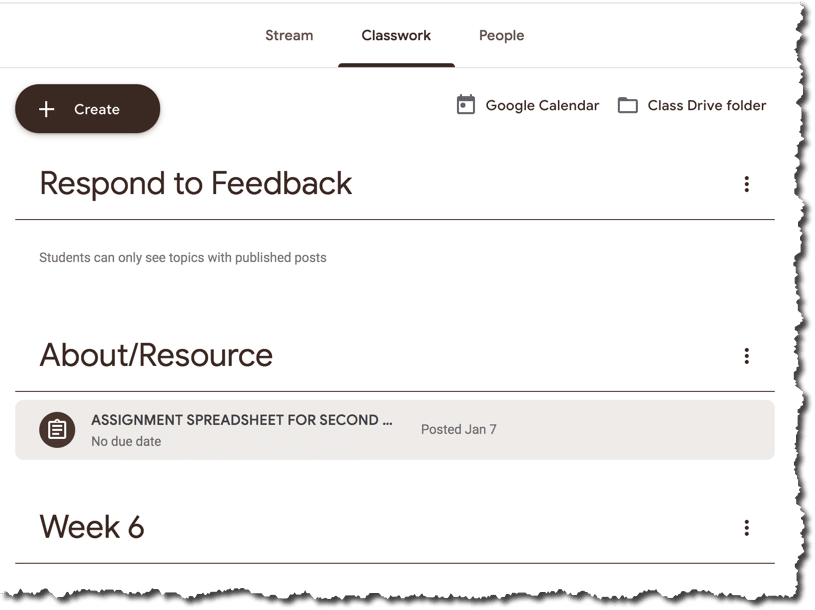
Respond to Feedback
I keep my topic at the top as “Respond to Feedback. This topic is INVISIBLE unless I have a live assignment in the topic. After I give feedback to students, I change the topic of the assignment to “Respond to Feedback” so that students know they have comments to respond to. Rather than editing the topic you can now drag that assignment up to the “Respond to Feedback” topic at the top! Once students have responded, drag it back down!
Today
I like to have a topic called “Today.” I want to eliminate hearing “What are we doing today?” DRAG assignments from the unit topic to the “Today” topic at the top (but under Respond to Feedback) for what they are doing “today.” Drag them back at the end of the day. This is especially helpful for assignments you are coming back to. “Let’s revisit…”






5 thoughts on “FINALLY! Dragging Assignments in Google Classroom”
Love your idea about Respond to Feedback! In case someone doesn’t know, any topic will be invisible unless it has assignments in it, so by dragging assignments in and out as needed, it will be invisible when it is empty.
However, I tried to drag a topic to the top and couldn’t – I still have to do the “move up” move which is tedious. Do I need an update on the software?
I find it glitchy on the computer. However, I am able to drag topics to the top easily on my phone.
Works amazing on my computer. The folks at Classroom did a nice job on this one.
What I want back is to be able to move the Stream items around…or at least to be able to put on top as we previously could.
:>(
Yay Google!!!