






Small Group Investigation
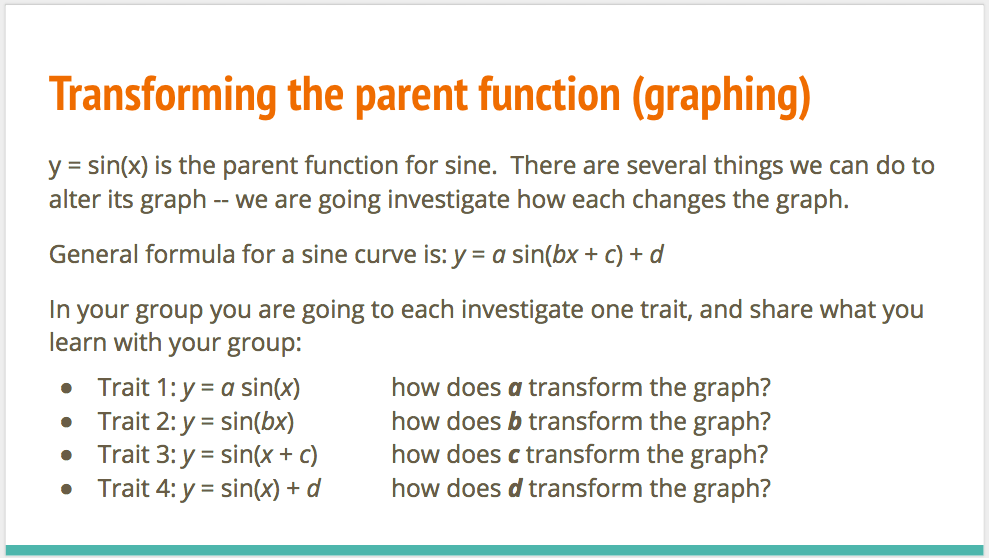
Math teacher Diana Herrington has been utilizing Google Slides with her math students in some really innovative ways. Rather than initially providing students with a Sine graph she instead has the students work in groups of 4. A slide in the group activity slides sets up the investigation. Each student is given a different part of the Sine graph to investigate. Each student uses Desmos to investigate the Sine graph. Student A will investigate how the graph is affected by the coefficient. Student B will investigate how the graph changes with a coefficient for x within the angle. Student C investigates adding within the angle. Student D investigates adding outside of the angle.
Insert Slides
Each group has a copy of the Google Slides that contains the investigation directions. Students can then add slides to the group Slides during the individual investigation process. Taking screenshots. Using text boxes students can record their observations.
Job Alikes
After doing an independent investigation and making observations. All of the Student A’s get together and discuss their findings. Investigating independently can result in some insecurity with their findings. Meeting together and having a conversation with the other students who investigated the same thing gave the students confidence that they really knew it.
Un-Job Alikes
Students then went back to their original group and had a conversation about their portion of the investigation.
Google Slides
Slides do not allow you to be too wordy. The slides can present the main idea to the student, additional comments can be put in the speaker notes.
Since the investigations and conversations are recorded in Google Slides it is easy to observe and insert comments during the process. Students are able to comment back, creating conversations with students.
Sample
This sample Google Slides is provided by Diana Herrington.





