






If you are trying to learn a new tool I suggest that you find other teachers who are using the tool so you can learn tips, best practices, innovative ways to use it and to be able to ask questions. In my opinion the best place to find these users is on Twitter. Twitter will give you access to a wide variety of users from across the world. This will maximize your exposure to ideas and people who are willing to help you. Also, people are on Twitter because they want to share and connect. You are not bothering a tweeting educator when you ask them a question!
Hashtags
A hashtag is a topic that is included on a tweet. The topic is preceded by the hashtag symbol. You can click on these hashtags in a tweet to see other people who are chatting on the same hashtag.
Follow the Company
Another good way to get help when you are using a tool is to follow the twitter handle of the company that makes the tool. Then you can ask the source directly!
I asked some twitter educators what companies respond to Twitter mentions. Here is a list of companies you might want to follow and interact with!
@maxcases @techsmith @techsmithedu @snagit @edutopia @classdojo @remindhq @edmodo @quizlet @freshgrade @spheroedu @nitroHQ @KaizenaHQ @gosphero @voxer @goguardian @SkypeClassroom @Animoto @Wonderopolis @GetKahoot @voicethread @noodletools @HstryOrg @voicethread @noodletools @HstryOrg @Socrative @Camtasia @HaikuDeck @myONreader @30hands @Desmos @Mathalicious @TuvaLabs @cloudapp @blendspace @Flocabulary @nearpod @Newsela @padlet @SpellingCity @EdciteTeam @GedditHQ @curriculet @PowToon @EasyBib @PlayOsmo @hopscotch @kodable @blendspace @EDpuzzle @HaikuDeck @Tackk @CueThink @PearDeck @scribblepress @puppet @MobyMax @SymbalooEDU
Follow the Hashtag
Here are some hashtags that you can use to help you become a ninja at the tools you are using.
#GoogleCT
#GoogleET
#GAFEsummit
#GoogleClassroom
#GoogleSheets
#GoogleDrive
#GoogleSlides
#MinecraftEDU
#edmodochat
#classdojochat
#OneNote
#Socrative
#Kahoot
#EasyBib
#MIEExpert15
#msftedu
#onenoteclass
#sway
#officemix
Product = Hashtag
Very likely the name of the product IS the hashtag. Try searching for #productname and seeing if people are tweeting with that hashtag.
Use Tweetdeck
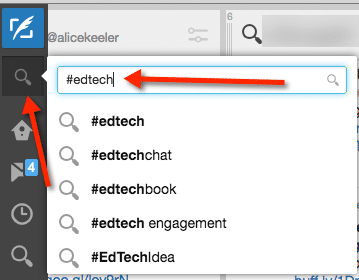
Go to http://tweetdeck.com and login with your Twitter account. You can set up columns in Tweetdeck to always show the hashtag of the tool you are trying to learn. Click on the search icon in the upper left and type in your hashtag.
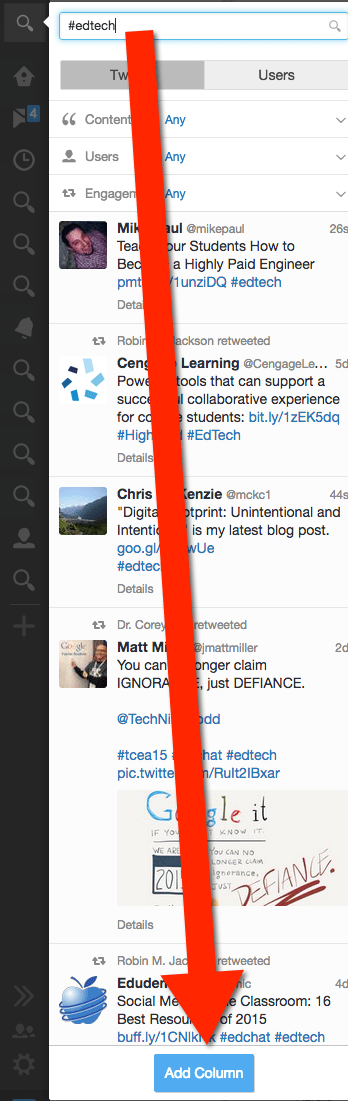
Press enter. At the bottom click “Add Column.”
Check in on Tweetdeck at least once a day and see what people are saying on the hashtag. Reply and Retweet! Ask questions by using the hashtag in your tweets.





