





If you want to put math symbols into your Google Presentations it can be a little tricky. In Google Docs there is an equation editor that will allow you to directly insert equations. (Note: If you know LaTeX you can use the LaTeX notation instead of using the toolbar to save yourself time).
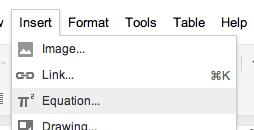
However, in Google Presentation there is not the option to insert an equation so you have to do a work around.
Option 1) Go to www.mathtype.com and download a 30 day trial. It will revert to a free version in 30 days, but the free version has most of the functionality that you need. Then you can use www.tinygrab.com to do a screenshot of your equation. TinyGrab will automatically upload your image to the web and will put the URL on your clipboard. In Google Presentation insert and image via URL and just paste. (Note: you have to set your grabs to be “private” grabs in your TinyGrab control panel in order to enable long URL’s).
Option 2) Penny posted on her blog (http://cyberspaced.blogspot.com/2011/04/latex-writing-maths-chemistry-or.html) about how she uses the website http://www.codecogs.com/latex/eqneditor.php to create math images that you can download and then upload into your Google Presentation.
https://docs.google.com/present/view?id=dfgzmcm3_748g4mq6jfz
[presentation id=dfgzmcm3_748g4mq6jfz size=m interval=5 autoStart=true loop=true]





