


Tabbed Browsing
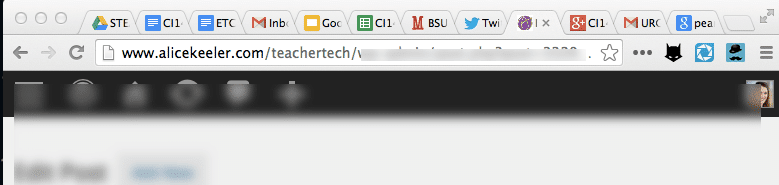
As a teacher we frequently need to multi-task what we are doing on the internet. We need a tab open for our email, the gradebook, Google and any other projects we are working on. Frequently I am going back and forth between two particular tabs.
Pull a Tab Out
If you click and grab a tab you can pull the tab OUT from the the collection of tabs into its own window. This is handy for when I need to rearrange 2 tabs side by side.
Put a Tab Back
If you click and hold down on a tab you can drag the tab to join another collection of tabs.
Drag a Tab
Rather than pulling the tab in or out you can move the tab to a new position. If you are working on tab 2 and 7 you can click on tab 7 and hold down the mouse click. This will allow you to slide the tab over to the number 3 slot to allow these two tabs to be in close proximity.
Duplicate a Tab
Using Google Chrome if you right click on a tab you can choose to “Duplicate” the tab. If I am looking at a particular email but need to reference another email I will duplicate the email tab to allow me to find the information I need without saving my original email as a draft.

Control T
Control T on a PC (Command T on a Mac) will open a new tab. Get in this habit, I use this keyboard shortcut multiple times a day.
Control W
Control W closes a tab. Once you get in the habit of closing tabs with the keyboard shortcut you will find your workflows to be greatly improved.