




Many of our students have some sort of device that takes video. This is the perfect opportunity to have students create. But how do you manage the videos once they make them?
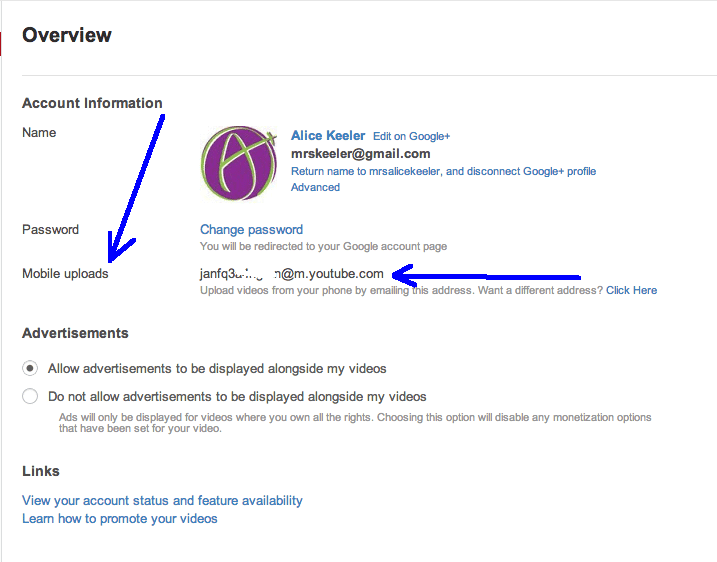
YouTube makes it easy. Go into your YouTube settings and obtain the mobile email address. Share this email address with your students (sorry you can not do an email forwarder, I tried that). Suggestion that students make a contact card in their phone with your YouTube mobile email address and your mobile upload email for Picassa and any other accounts that allow submitting via email.
Students then email their videos to YOUR class YouTube channel. Then all of the videos are in one account. You can populate a playlist of all of their student videos for that one project. You can also set all of the videos to have a creative commons license and use the YouTube video editor to do a montage of the student videos to create a class movie trailer for the overall project.
Step 1: Log into YouTube
Step 2: Click on your name in the upper right hand corner

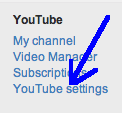
Step 3: Click on YouTube Settings
Step 4: Take note of the mobile upload email address. Share this email address with your students.





4 thoughts on “Students Submitting YouTube Videos”
Alice, did you find any limitations on the length of videos that can be uploaded using this method? We tried it with our kids, but found that anything more than 60 seconds failed to upload. I cannot for the life of me figure out why this would be, since YouTube purportedly accepts videos up to 15 minutes in length.
No, have not run up against limits. I would imagine it has to do with the limits on your account.
YouTube is open at your school to students?
YouTube is open to students at MANY schools. Spread the word.